

Published: Updated: Alec Mikolas 9 min read


A Real-World Case Study From Apex Security
The advertisement looked legitimate. The software did too. But a routine web search led to an in-memory attack that a generic endpoint alert did not fully explain.
Most business owners picture a cyberattack starting with a suspicious email, a sketchy link, or a fake invoice. Someone clicks, attackers get in, and the IT team scrambles to clean up the damage.
In April 2026, the CompassMSP Apex Security team investigated an incident that began with something far more ordinary: an employee researched software online and followed an advertisement to a free PDF converter. The downloaded file appeared legitimate. An endpoint security tool generated a memory alert, but forensic analysis revealed additional execution activity the alert alone could not explain.
Here's what happened, why it matters, and what businesses can learn from the investigation.
The Investigation at a Glance
01 / The Entry Point
Key Takeaways
- A paid search advertisement can lead an employee to a malicious software download.
- An endpoint alert provides a starting point for investigation rather than a complete account of an attack.
- Forensic analysis can reveal execution activity and additional payloads that need investigation.
- Include software download controls, employee guidance, and response ownership in the security review.
The Problem: Poisoned Ads Are a Phishing Alternative
Email phishing remains a major security concern, and training employees to recognize it matters. But inbox vigilance alone could not have prevented this incident. The lure reached the user through an advertising network while they browsed the web for a legitimate work task.
This technique is called malvertising, or malicious advertising. The Center for Internet Security ranked malvertising as its top initial infection vector in Q3 2024. Attackers can purchase or otherwise use legitimate ad placements to direct people to convincing, malicious software sites.
How the Attack Unfolded
The malicious download was not the first step. The attacker exploited an ordinary path from search to software installation.
- Routine Software SearchThe employee looks for a practical utility to complete a work task.
- Paid AdvertisementAn advertisement directs the user to a software offer.
- Convincing Download PageThe site presents a polished product and a seemingly normal installer.
- In-Memory ExecutionThe installer leads to a secondary payload and process activity.
- Forensic ReconstructionAnalysts connect the browser, file, and memory evidence.
Simplified attack sequence based on the incident's browser and endpoint forensic artifacts.

The Important Distinction
The employee did not need to open a suspicious email. A familiar browsing task and a professional-looking software download created the opportunity.
The Blind Spot: Subsequent Payloads in Memory
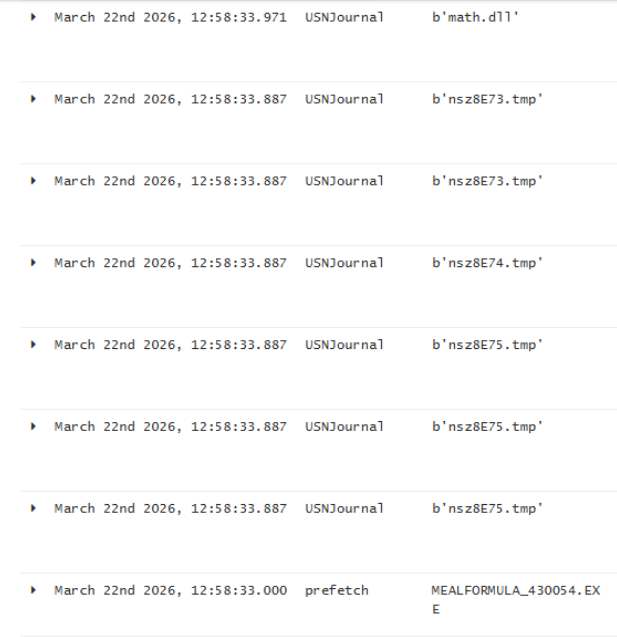
Endpoint detection and response tools can identify suspicious activity, but not every alert contains the full story. In this case, forensic analysis traced execution to a secondary payload called math.dll, associated with process injection and in-memory execution. Such activity can leave less conventional file evidence for investigators to examine.
02 / The Investigation
What Apex Security Found: A Real-World Case Study
The Apex Security team investigated an endpoint's generic memory alert and uncovered multiple fake software lures connected through related infrastructure. Browser artifacts included the gad_campaignid parameter, consistent with a Google Ads delivery path.
The Fake Software Brands
Advertised as a free PDF converter for Windows.
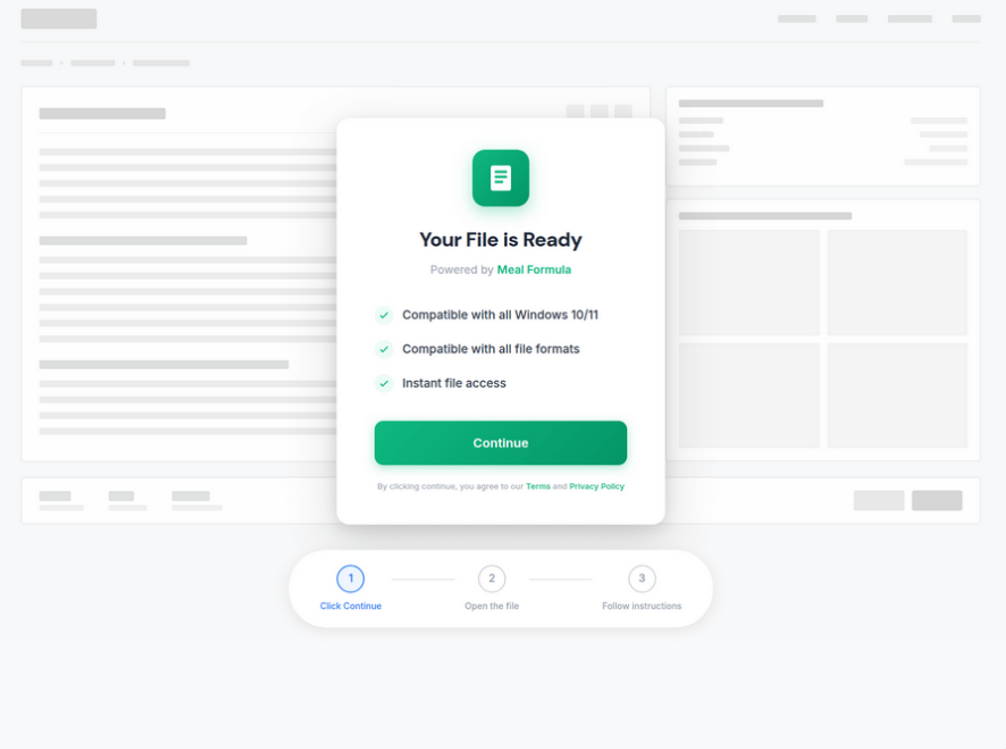
Advertised as an AI-powered meal-planning app for Windows.
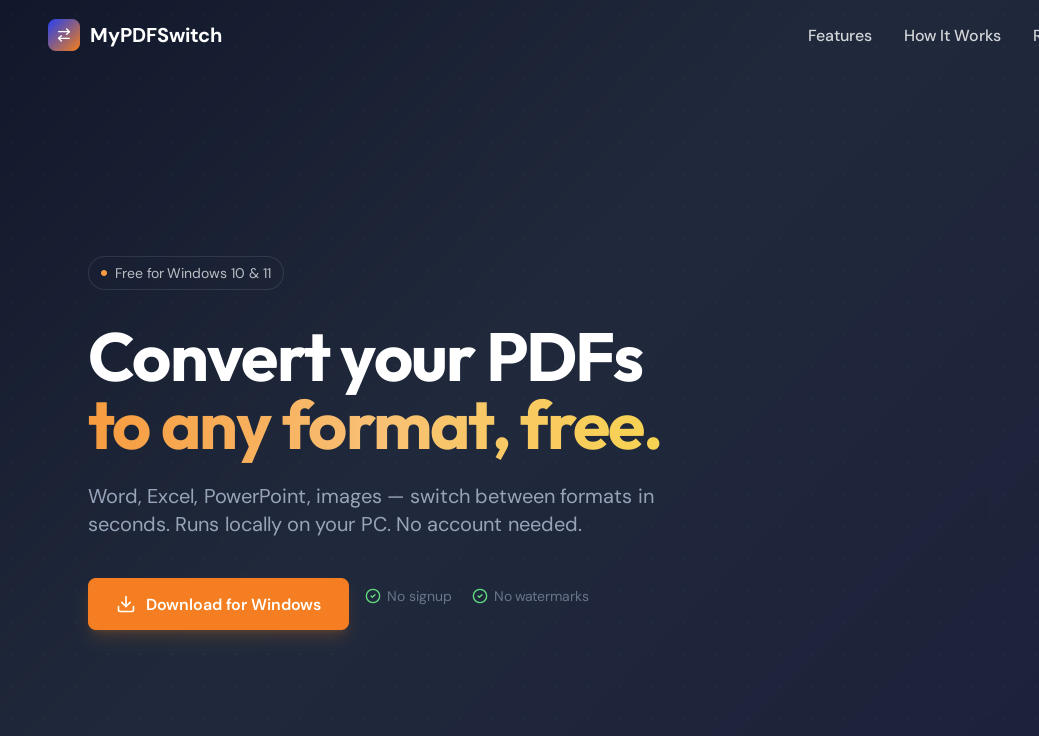

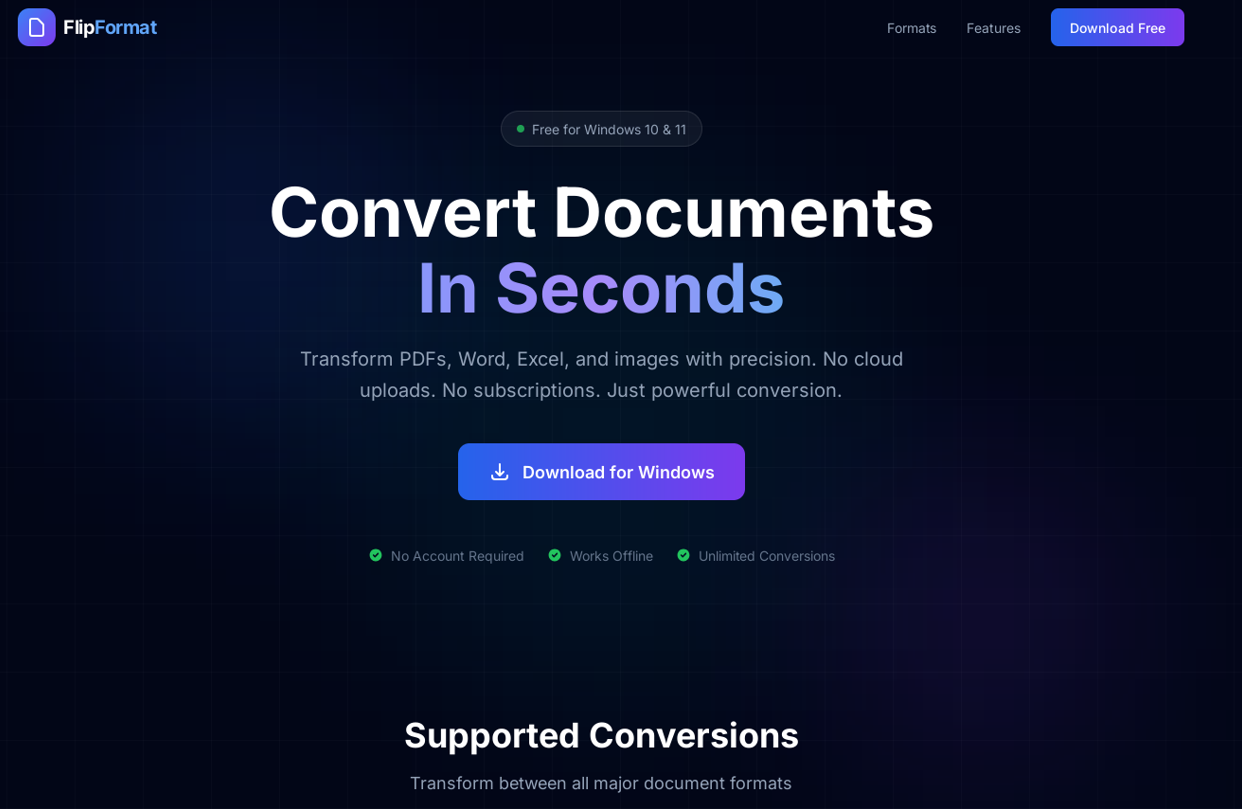
Both landing pages used polished branding, feature descriptions, and prominent download buttons. They resembled legitimate software websites. The team also identified the FlipFormatPDF variant using related delivery infrastructure.
Emerging Campaign Variations
Apex Security identified additional software-lure variations that appeared to follow a similar delivery pattern. The applications and bundled components changed, while the overall approach remained consistent.
The Payload
The MyPDFSwitch and MealFormula downloads appeared to deliver WinRAR 7.20.0 installer components. The FlipFormatPDF variant contained SumatraPDF components. Investigators considered whether abuse of these components helped facilitate in-memory code injection; the precise exploitation mechanism requires validation.


The team reconstructed an execution path involving the downloaded installer and a secondary DLL:
C:\Users\[REDACTED]\Downloads\MealFormula_430054.exe
  ↓
C:\Users\[REDACTED]\AppData\Local\Temp\nsn7129.tmp\math.dll
The Alert Was a Starting Point, Not an Answer.
The existing EDR agent generated a generic memory alert but did not fully identify or mitigate the malicious execution. Apex Security's forensic investigation reconstructed the activity and provided the context needed to evaluate the incident.
Attribution and Related Lures
Code-signing artifacts referenced an entity named INSTALLERIM LLC. Threat-intelligence research also surfaced names including FoodFormula, KitchenCanvas, and RecipeUp in possible related activity. Those clues help analysts investigate campaign relationships, but they do not independently establish an attacker's location, identity, or use of AI-generated content.
03 / The Exposure
Why This Works Against Businesses
Employees need software to do their jobs. They search for PDF converters, productivity apps, and specialized utilities. Attackers exploit that routine behavior by making malicious downloads look useful, credible, and easy to access.
A security alert may identify suspicious behavior without explaining the full chain of events, affected assets, or whether malicious execution continued. An organization needs both technical telemetry and people capable of investigating it.
The Business Context
$4.88MAverage global cost of a data breach reported by IBM in 2024.
This industry benchmark does not represent the cost of the Apex incident. Source: IBM Cost of a Data Breach.Detection Is Not the Same as Understanding.
An alert can tell your security team that something unusual happened. Investigation explains what executed, which assets were affected, and what to contain.
Related: Estimate the potential cost of a data breach for your organization.
04 / The Response
The Solution: Forensic-Led Resilience
File scanning and alert monitoring are essential, but teams also need continuous behavioral visibility, investigation, and coordinated response. Analysts must follow suspicious process activity, understand the scope of an incident, and identify practical containment actions.

What a Forensic-Led Security Program Brings Together
Endpoint, identity, cloud, and network evidence reviewed in context.
Investigation of suspicious execution beyond files stored on disk.
Analysts reconstruct events, test hypotheses, and assess risk.
Endpoint, account, and network actions based on confirmed scope.
Findings and evidence that support remediation and compliance needs.
Response Starts With Context.
For mid-sized businesses, especially those in regulated industries, technical findings have to connect to real workflows. A suspicious utility on a production workstation may create a different operational risk than the same utility on an isolated test device.
05 / The Next Move
What Security Teams Should Do Right Now
- Review Software-Download Policies. Give employees an approved, practical path to request the utilities they need for their work.
- Investigate Browser-to-Process Activity. Correlate ad redirects, downloads, file execution, and unusual memory behavior.
- Test Response Readiness. Make sure someone can investigate ambiguous alerts and coordinate containment.
- Review Relevant Indicators. Treat domains and file hashes as investigative leads alongside behavioral telemetry.
Indicators of Compromise
These indicators appeared in the Apex Security case notes. Domains are intentionally defanged. Validate their relevance and the associated timestamps before blocking broadly.
Domain Indicators (8)
meal-formula[.]commypdfswitch[.]comflipformatpdf[.]comkitchen-canvas[.]comfoodformulaai[.]comfoodformulasetup[.]comformulas[.]foodformulasetup[.]compdfgrip[.]com
Reported SHA-256 Hash Associations (6)
- math.dll:
dfd1251da5da673223fc362f9ea82f9f536ef04c95c70435b7d5a1b7b9106396 - MealFormula.exe / MyPDFSwitch.exe:
cfca124c2141b4171cebad48cc286751910b408aec69767db2bc3af38f277a06 - FlipFormat.exe:
2be4a27b83830ea07c6671c3557673d509544e5f70fc6b2dc8cc4388b302c1f2 - FlipGrip.exe:
cfca124c2141b4171cebad48cc286751910b408aec69767db2bc3af38f277a06 - GiveMeRecipe.exe:
3c1dbc3f56e91cc79f0014850e773a7f12bbfef06680f08f883b2bf12873eccc - FoodFormula.exe:
b179bec73efe194bffb69eeedc8c136b5e7506a10b3589d223b1e6f8a8fbfb53
The source associates the same SHA-256 hash with two different filename entries. Confirm those associations with the Apex team before distributing an IOC bulletin.
Know What Happened. Know What Comes Next.
Apex Security combines continuous visibility and forensic expertise to help organizations investigate what their alerts cannot fully explain.
Research and artifacts supplied by the CompassMSP Apex Security Platform team. Confirm technical attribution, IOC mappings, and current service terms before publishing.

Alec Mikolas
Alec Mikolas is a cybersecurity expert focused on security operations, threat detection, and incident response. With deep technical experience across systems, infrastructure, and Linux environments, he designs resilient security programs built to perform under real-world pressure. He brings a practical, systems-level approach to cybersecurity, combining technical depth with real-world operational insight across infrastructure, support, and Linux-based environments.